List
A simple WYSIWYG editor field for ordered and unordered lists
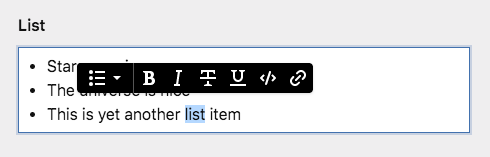
Example
fields:
  list:
    label: List
    type: list
Field properties
| Name | Type | Default | Description |
|---|---|---|---|
| after | – | Optional text that will be shown after the input | |
| autofocus | bool |
– | Sets the focus on this field when the form loads. Only the first field with this label gets |
| before | – | Optional text that will be shown before the input | |
| default | – | Default value for the field, which will be used when a page/file/user is created | |
| disabled | bool |
– | If true, the field is no longer editable and will not be saved |
| help | – | Optional help text below the field | |
| icon | string |
– | Optional icon that will be shown at the end of the field |
| label | – | The field label can be set as string or associative array with translations | |
| marks | true |
Sets the allowed HTML formats. Available formats: bold, italic, underline, strike, code, link. Activate them all by passing true. Deactivate them all by passing false
|
|
| placeholder | – | Optional placeholder value that will be shown when the field is empty | |
| required | bool |
– | If true, the field has to be filled in correctly to be saved. |
| translate | bool |
true |
If false, the field will be disabled in non-default languages and cannot be translated. This is only relevant in multi-language setups. |
| when | – | Conditions when the field will be shown (since 3.1.0) | |
| width | string |
1/1 |
The width of the field in the field grid. Available widths: 1/1, 1/2, 1/3, 1/4, 2/3, 3/4
|
Choosing available marks
The list field supports the following marks by default:
bolditalicunderlinestrikecodelinkemail(since v3.6.0)
fields:
  list:
    type: list
    marks:
        - bold
        - italic
        - strike
How to use in templates/snippets
The content of the list field is stored as plain HTML. To render the field in your template, echo the value.
<?= $page->list() ?>